Microsoft Teams (Video)
How to use our Microsoft Teams Video Integration.
How the Microsoft Teams integration is used
Chezie integrates with both Microsoft Teams for video and chat. Here's how we consume data in both of those integrations.
Microsoft Teams - Chat
Our Teams integration for chat has four primary functions:
-
Sync membership between Teams channels and Chezie
-
Push notifications for group updates like new events or updates to landing page
-
Track engagement within a Teams channel (coming soon)
-
Allow users to push notifications to a Teams channel (coming soon)
Microsoft Teams - Video
Our Teams integration for video has three primary functions:
-
Create a Teams meeting when scheduling a new event
-
Modify a Teams meeting for an already scheduled event
-
Delete a Teams meeting for an already scheduled event
The Chezie Microsoft Teams integration connects to an individual Teams channel - one per ERG - via oAuth. With this integration, we can push updates to specific channels and measure engagement within a channel. We can also utilize Teams video meetings to add links to newly scheduled ERG events.
The data in our Teams integration is limited and targeted, and access is granted through Microsoft’s secure API. Any data saved is to maintain a reference from a user to an ERG group, and data is encrypted at rest.
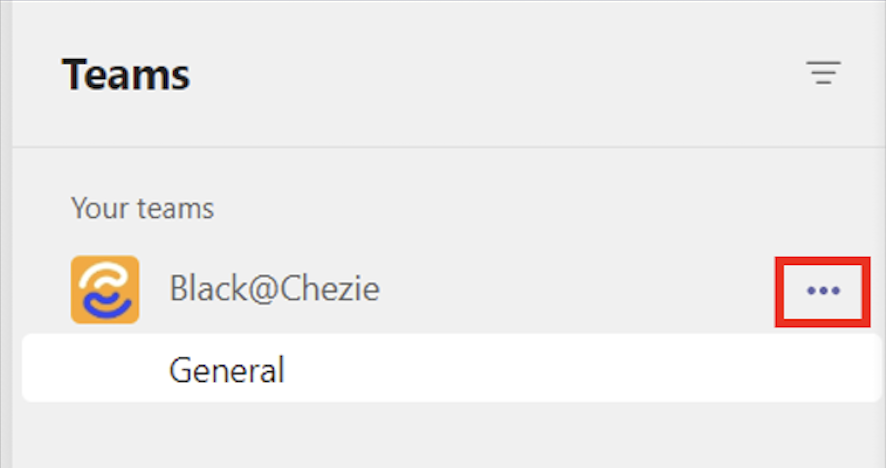
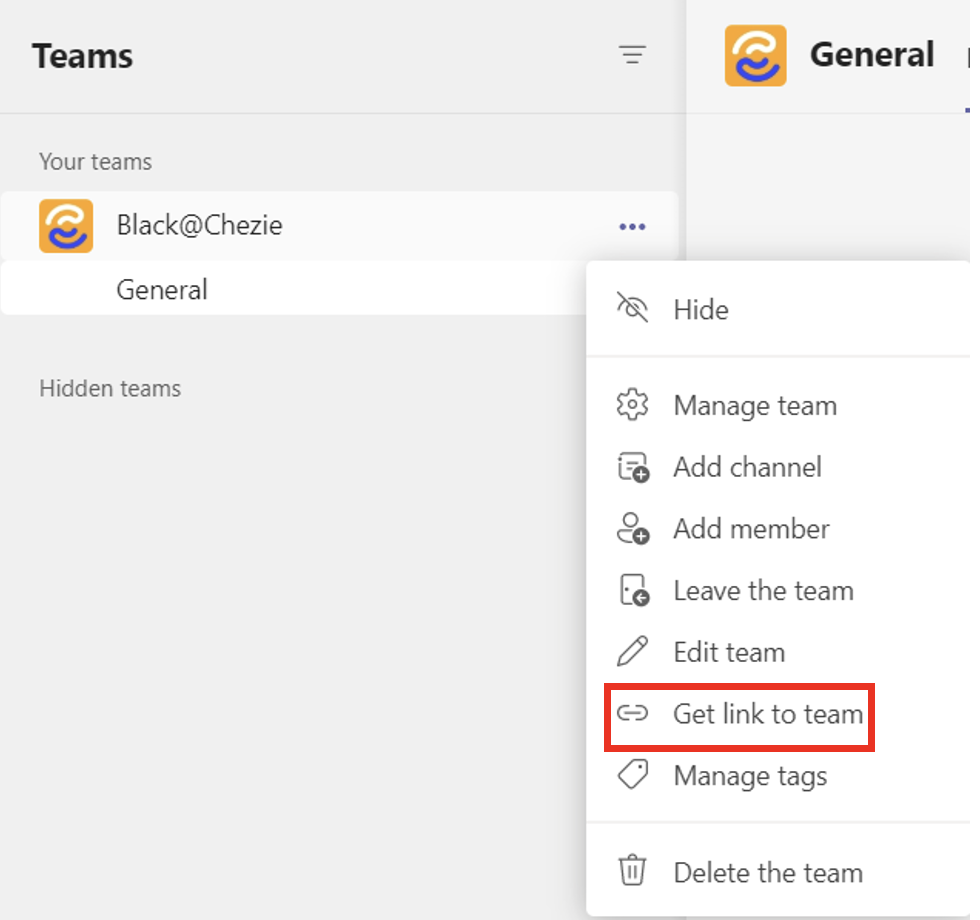
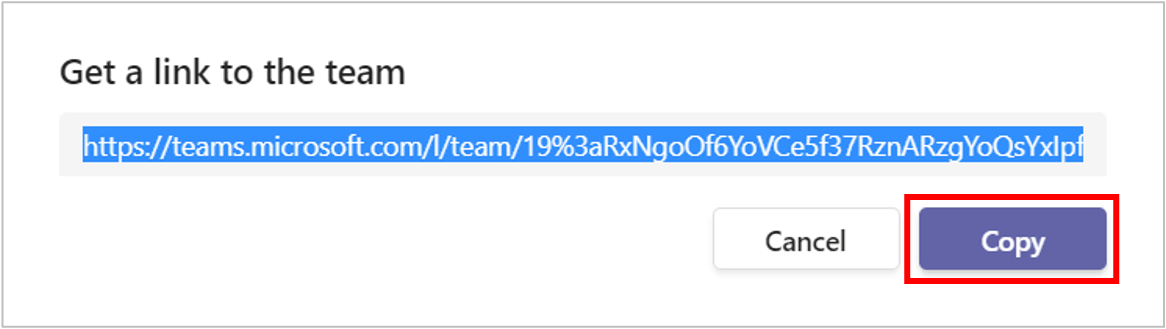
How to get your ERG’s Teams Channel URL
- Click the three dots for your Group's channel.
- Click Get link to team.
- Click Copy to copy the URL.
Microsoft Teams (Video) - IT Details
Here are details about our Microsoft Teams for Video application.
Provided are details on Chezie’s Microsoft Integration Video:
User role to install application
Account admin(s)
Permissions
On behalf of the app, Chezie can:
-
Retrieve the properties and relationships of a profile object for a given user. A full list of relationships can be found here.
-
Properties include:
- User ID
-
Relationships include
-
Accounts
-
Anniversaries
-
Interests
-
Positions
-
-
View a user’s display name, given name, job title, office location, email, surname
-
Delete a profile object
-
Create an event
Scopes
-
Click on scope for a detailed overview of their access.
-
Profile
-
Calendars.ReadWrite
-
Offline_access
-
Microsoft Teams (Chat) - IT Details
Here are details about our Microsoft Teams for Chat application
User role to install application
Account admin(s)
Permissions
On behalf of users, Chezie can:
- Send channel messages in Microsoft Teams
On behalf of the app, Chezie can:
-
View a user’s display name, given name, job title, office location, email, surname.
-
Retrieve the properties and relationships of a profile object for a given user. Properties include user ID. Relationships include accounts, anniversaries, interests, interests, and positions. A full list of relationships can be viewed here.
-
Create groups and read all group properties and memberships on behalf of the signed-in user. Additionally allows group owners to manage their groups and allows group members to update group content.
-
Create groups and read all group properties and memberships on behalf of the signed-in user. Additionally allows group owners to manage their groups and allows group members to update group content.
-
List groups and read their properties and all group memberships on behalf of the signed-in user. Also allows the app to read calendar, conversations, files, and other group content for all groups the signed-in user can access.
Scopes
Click on scope for a detailed overview.